


Breaking News Launcher
4.311.00 Reviews
App Specs
- Version
- 1.5.0
- Updated On
- License
- Free
- Downloads
- 10,000+
- Developer
- AtomApplications
- Categories
- News & Magazines
- Platform
- Android
Screenshots
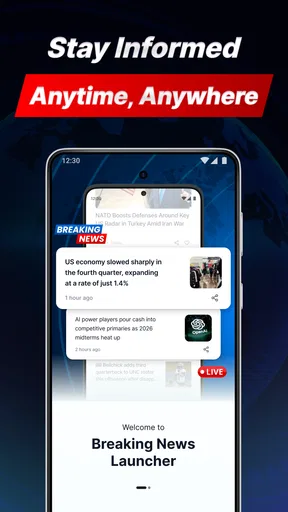
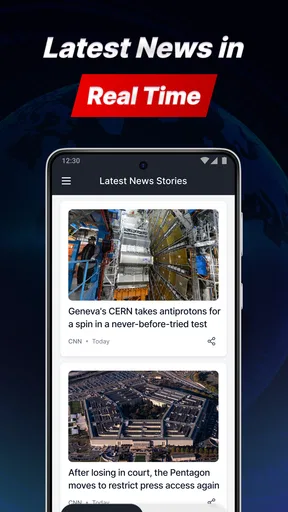
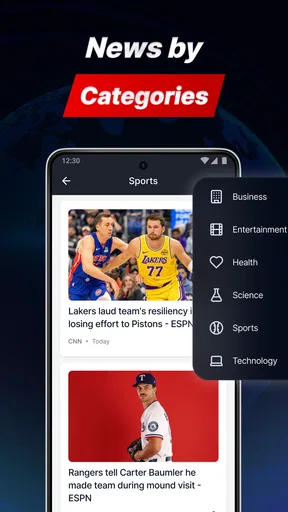
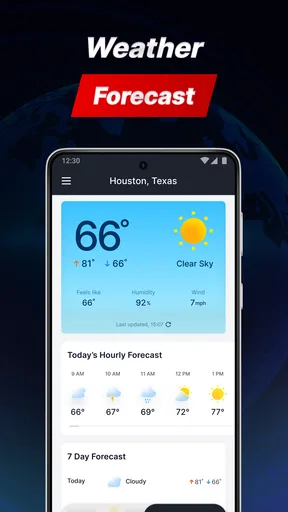
 Analysis by AppCompare
I approached Breaking News Launcher as a practical news and magazine app rather than as a full replacement for every news service on my phone. Its focus is clear: it brings together business, sports, entertainment, and technology news, while also offering a local weather forecast service. That combination makes it interesting for people who want a quick daily briefing instead of several separate apps.
What stood out to me first was the balance between breadth and simplicity. The app is made by AtomApplications, is free to use, and carries an Everyone 10+ content rating. Its current release is version 1.5.0, and it requires Android 10 or later. Those details make it a fairly accessible option for people with reasonably modern Android devices, although anyone using an older phone will need to check compatibility before planning around it.
The app has reached over ten thousand installs and holds a 4.3 average from around eighty ratings, with roughly eleven written reviews. That is enough to suggest that real users have tried it, but it is still a relatively small audience compared with long-established news platforms. I would treat that rating as encouraging rather than conclusive, especially when deciding whether it should become my only source of news.
How Breaking News Launcher fits into a daily routine
I find it easiest to make Breaking News Launcher useful by giving each visit a purpose: check the forecast before heading out, scan a couple of relevant news areas, then close it when I have what I need. That small routine keeps a broad mix of topics from turning into aimless scrolling. Once the habit feels natural, I can look at which available settings and shortcuts make those checks quicker without adding clutter.
A compact starting point for several interests
My favorite way to use Breaking News Launcher is as a first-stop check-in. Instead of opening a business app, a sports app, an entertainment feed, a technology publication, and a weather service one after another, I can begin with one place and decide what deserves more attention. That is especially useful during a busy morning, when I want orientation rather than a long reading session.
The category mix is broader than the name might initially suggest. Business and technology are useful for work-related awareness, sports suits quick score or event checks, and entertainment adds a lighter section for breaks. Weather gives the app a practical reason to remain part of a routine even on days when there is no major headline worth following.
I would not describe this as a substitute for specialist journalism. A dedicated business publication is usually better when I need market context, while a sports service may provide deeper live coverage. The strength here is the handoff between topics. I can scan several areas quickly, identify what matters, and then move to a more focused source when a story deserves careful reading.
Worth Reading Before You Choose

EA SPORTS FC Mobile 26 Is a Bigger Football Game, but It Takes Time

Flipboard Shows What News Apps Must Do Beyond the Feed

Switching to Android Auto Means Rethinking Your Driving Routine

Google Calendar Makes a Crowded Week Easier to Manage

Ludo King Makes the Most of the Minutes Between Plans

Baby Panda World Brings Quick Play to Modern Phones, but Its Game Library Feels Busy
A realistic morning workflow
For a typical weekday, I would open the app before leaving home and check the weather first because it affects what I wear and how I travel. I would then scan business and technology headlines for anything relevant to work, glance through sports if there was an event I followed, and leave entertainment for later. This order keeps the practical information ahead of the optional reading.
That workflow also exposes one of the app’s trade-offs. A broad news screen can save time, but it can also encourage shallow scanning. If I see several interesting headlines, I need to slow down and read them rather than assuming the headline gives me the full story. The app works best as a launch point for awareness, not as a replacement for thoughtful reading.
Another useful habit is to separate “check now” information from “read later” information. Weather belongs in the first group, while a technology or business story may deserve a quieter moment. Treating every item as equally urgent makes any news app tiring. Breaking News Launcher is more manageable when I use it to prioritize rather than endlessly refresh.
What the developer and rating tell me
AtomApplications presents a focused product rather than a large ecosystem of connected services. That can be positive for someone who wants a straightforward tool, but it also means I would not approach it expecting the extensive customization, archives, or editorial depth associated with major news brands.
The 4.3 average is a useful signal that the basic experience works for many people who have rated it. At the same time, the limited review volume means I would pay closer attention to my own experience with navigation, story relevance, and weather usefulness. A score is a starting point, not a guarantee that every section will suit my habits.
Trust begins with what I can actually see
When I evaluate a news app, I do not judge trust only by how polished the headlines look. I also want to know what the app visibly asks me to do, what choices it presents, and whether I can use it without surrendering more control than necessary. With Breaking News Launcher, I would inspect the permission prompts and any privacy or account screens during setup instead of accepting everything automatically.
That is not a criticism of this particular app; it is a sensible step for any application that handles news interests, location-related weather choices, or account settings. The important distinction is between a permission or control that is clearly explained and one that appears without context. I prefer to make those decisions myself, at the moment they are requested.
I also avoid treating a weather result as automatically precise for every situation. Local forecasts can depend on the selected place and the way the service defines “local.” Before relying on it for a trip, outdoor work, or a serious weather decision, I would confirm that the location shown is the one I intended and compare it with an official weather source when conditions matter.
Permissions and data-sensitive moments
The most data-sensitive moment is likely to occur when I configure location-related weather information or sign in, if an account option is offered on the device. I would read each prompt and choose the narrowest setting that still supports the feature I want. If the weather service can work with a manually selected location, that may be preferable for someone who does not want continuous location access.
I would also review whether notifications are enabled during setup. Breaking news alerts can be useful during a major event, but they can quickly become disruptive if every headline arrives immediately. Starting with notifications off, or with only the most important choices enabled when the app provides those controls, gives me a calmer experience and prevents the app from deciding my schedule for me.
Account controls deserve the same attention. If I can use the news sections without creating an account, I would begin that way. If a login is needed for a particular feature, I would check what the account screen asks for and whether there is a clear way to sign out. The practical rule is simple: I should not create an account merely because the app presents one as the first path if the core reading experience works without it.
I would not infer privacy protections from the app’s category, rating, or install count. Those figures describe popularity and audience suitability, not data handling. My trust decision would come from the visible permission requests, privacy explanations, account controls, and choices offered inside the installed app. That approach is more reliable than assuming a free app has either unusually strong or unusually weak practices.
Keeping control over the news experience
User agency matters in a mixed news app because different people have very different tolerance for alerts, personalization, and repetition. I want to be able to decide which sections I check, whether weather is relevant to me, and when the app is allowed to interrupt me. Even simple controls can make the difference between a useful briefing and a source of background noise.
One practical tip is to establish a fixed checking routine instead of opening the app every time I feel bored. A morning scan and an evening catch-up are enough for many users. This reduces the temptation to chase every update and makes it easier to notice whether the app is actually helping me stay informed.
A second tip is to use the sections according to purpose. I would use business and technology for work awareness, sports for event-specific checks, entertainment for lighter reading, and weather for immediate planning. This prevents the broad selection from becoming an unstructured stream and helps me recognize when another app is more appropriate.
A third tip is to verify important stories outside the app before acting on them. A headline about a business development, a health-related event, a severe weather situation, or a major public issue deserves confirmation from a trusted specialist or official source. The app can help me discover a story quickly, but discovery and verification are different tasks.
Where it is stronger than the usual alternatives
Compared with opening several individual publisher apps, Breaking News Launcher is more convenient for a quick cross-topic scan. I do not have to remember which service covers technology, which one handles sports, and which one I use for entertainment. The weather component also gives the app a daily utility beyond headline reading.
Compared with a single newspaper app, it may feel less tied to one editorial identity. That can be useful when I want a wider starting view, but it also means I should be more active about checking the source and context of a story. A single publication may offer a clearer voice and deeper reporting, while this app’s appeal is the convenience of moving across subjects.
Compared with a social media feed, I would expect a more intentional news-focused experience because the app is built around recognizable information areas rather than a general stream of posts. Still, I would not assume that every headline is equally important or equally well explained. The same basic media-literacy habits apply: check the source, read beyond the title, and avoid sharing before confirming.
Compared with a dedicated weather app, the local forecast service is more convenient for casual planning but may not offer the specialist tools that weather-focused users want. Someone who needs radar, detailed alerts, or advanced forecasts should keep a dedicated weather option available. For deciding whether to take a jacket, the integrated service may be enough; for serious planning, I would choose the more specialized tool.
Who should use it, and who should skip it
I think Breaking News Launcher is a good fit for Android users who want one free place to check several everyday topics. It suits people who enjoy a short briefing, commuters who want weather alongside headlines, and readers who prefer discovering subjects before deciding where to read more deeply.
It is less suitable for someone who wants one publication’s complete reporting, a highly specialized sports experience, or advanced weather information. I would also skip it as a primary news source if I needed extensive archives, investigative depth, or a carefully curated professional briefing. In those cases, a dedicated service is likely to be more satisfying.
People who dislike notifications should pay attention during setup and adjust them deliberately. Likewise, users who are cautious about location or accounts should review each visible choice rather than moving through installation on autopilot. The app can still be useful, but only if its controls fit the way that person prefers to manage attention and personal information.
My cautious verdict
After using Breaking News Launcher as a broad daily checkpoint, I see its value in convenience. It brings business, sports, entertainment, technology, and local weather into one routine without asking me to maintain a collection of separate starting points. Its free price makes experimentation easy, and the current version gives prospective users a clear compatibility point for Android devices running version 10 or newer.
My recommendation comes with an important boundary: I would use it to find and organize what deserves attention, not to replace specialist reporting or independent verification. I would also make privacy and notification decisions consciously, checking permissions, account options, and location choices as they appear. The best experience comes from treating the app as a controlled briefing tool, not an always-on stream.
For a reader who wants a quick, mixed-topic news check with weather included, this is a sensible app to try. For someone who needs depth, advanced controls, or a single authoritative editorial source, another option will probably be better. My final view is cautiously positive: Breaking News Launcher is most convincing when I keep its role focused, use its sections intentionally, and remain responsible for confirming the stories that matter.
Pros
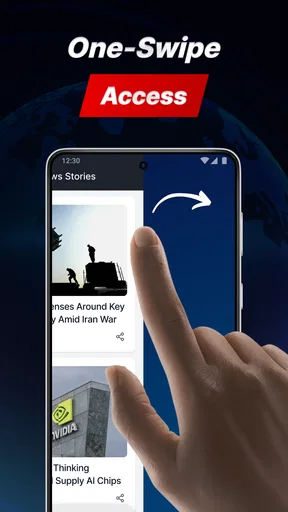
- Delivers breaking headlines directly on the home screen
- Reduces the need to open a separate news app
- Can help users discover stories from multiple sources
- Useful for quickly checking major updates throughout the day
- Lightweight launcher experience with news-focused customization
Cons
- Frequent alerts may become distracting or overwhelming
- News quality depends on the sources selected by the service
- Personalization options may feel limited for advanced users
- Home-screen news content can use additional mobile data
- Launcher replacement may require time to adjust to
FAQs for Breaking News Launcher
What is Breaking News Launcher, and how does it work?
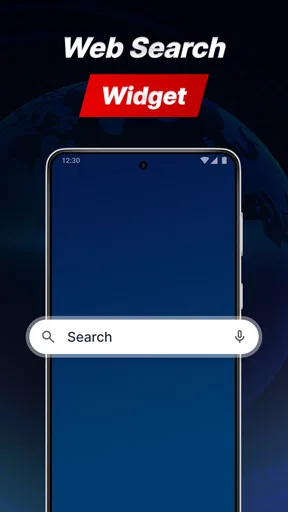
Breaking News Launcher is an Android-style launcher experience designed to place news and headline content closer to your home screen. After installation, it may replace or work alongside your normal launcher, depending on the device and setup. It can provide quick access to selected news categories, shortcuts, and phone functions, helping users check current stories without opening a separate news application.
Does Breaking News Launcher replace my phone’s default home screen?
The application may ask to become your default launcher, which means it controls the home screen, app shortcuts, widgets, and navigation experience. You can usually test it first and return to your previous launcher through Android’s settings if you decide it is not suitable. Before confirming, check the launcher selection screen carefully and make sure you know how to switch back.
What permissions does Breaking News Launcher require?
The permissions requested can vary according to the version, device, and features enabled. A launcher may need access related to displaying the home screen, showing notifications, or opening shortcuts, while news functions may use an internet connection to retrieve updated content. Review every permission request before accepting it, and deny access that is not necessary for the features you intend to use.
Can I customize the news content and appearance?
Customization options depend on the version of Breaking News Launcher installed on your device. In general, users should look for settings that control news categories, notification behavior, layout, wallpapers, icons, or the amount of content shown on the home screen. If personalization is important to you, explore these menus after installation and confirm whether unwanted topics or promotional content can be hidden.
Is Breaking News Launcher safe to download and use?
Download Breaking News Launcher only from a trusted official store or a verified source, and check the developer name, ratings, recent reviews, update history, and privacy information before installing. Because a launcher can influence the phone’s main interface and may display online content, users should also review its permissions and data practices. Avoid unofficial modified versions, which may contain unwanted software or security risks.


